
第13章 进程和线程
13.1 相关的基本概念
13.3.1 并行和并发
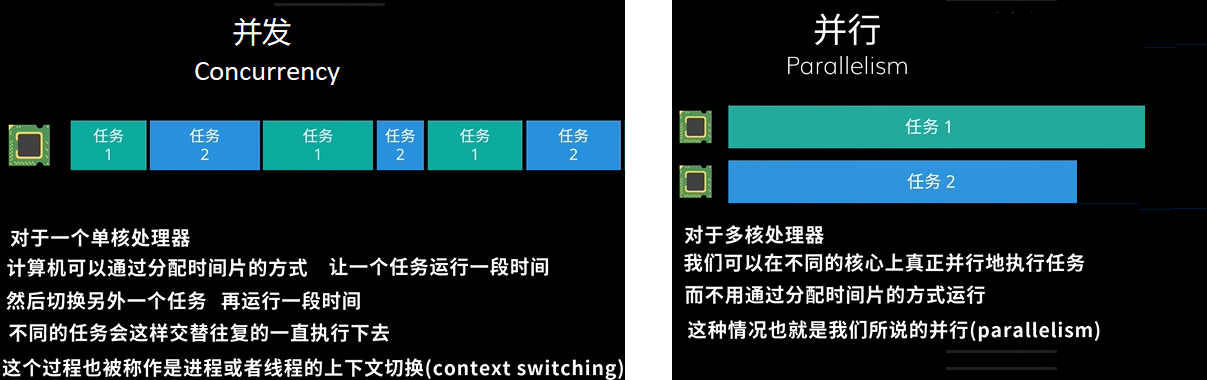
- 并发:单个 CPU 处理多个任务。各个任务交替执行一段时间。
- 并行:多个 CPU 同时执行多个任务。
关于并行和并发,关注的是任务是否
同时执行
13.3.2 同步和异步
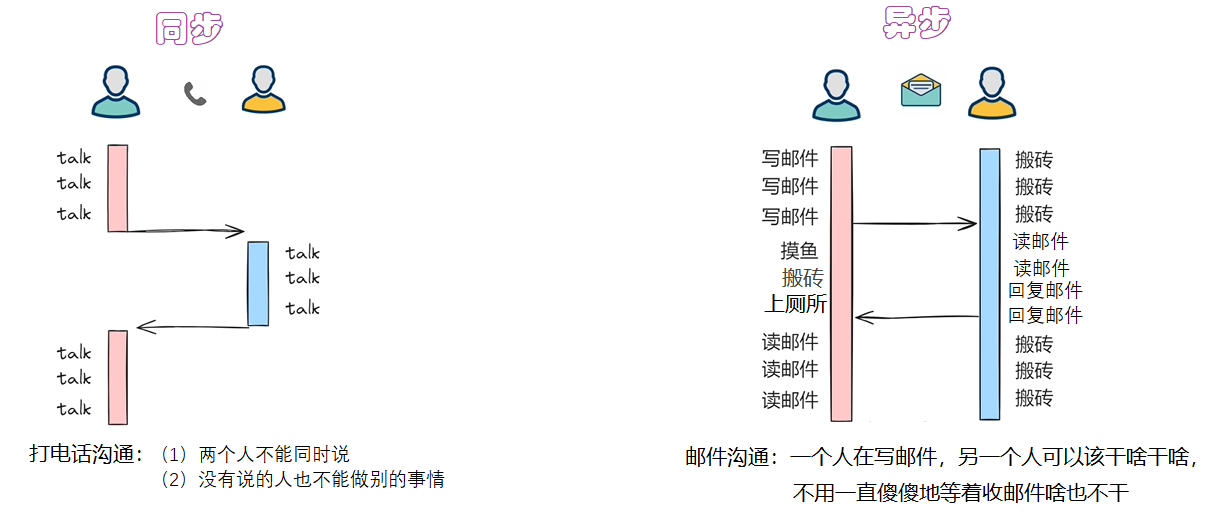
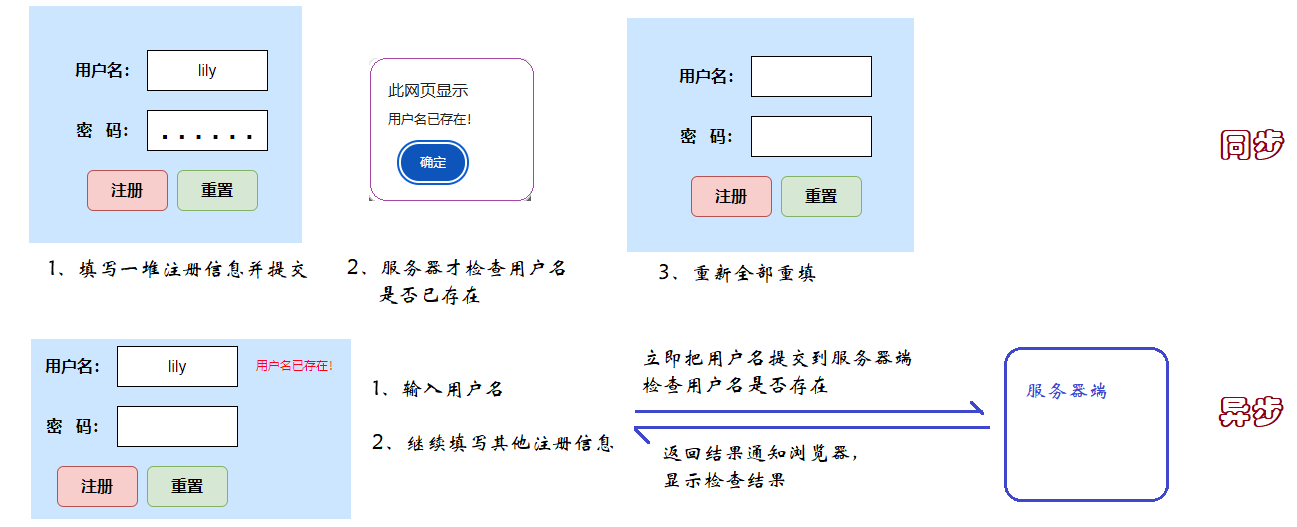
- 同步:只能有一个任务执行,当前任务执行的时候,其他任务要等待。即多个任务排队执行。
- 异步:多个任务同时执行,任务之间互相不影响。
关于同步和异步关注的是调用者是否需要等待被调用任务完成才能继续执行。
案例1:
案例2:
13.2 进程
13.2.1 什么是进程
- 操作系统中一个正在运行的程序或软件就是一个进程。
- 进程是操作系统进行资源分配的基本单位。
- 每个进程都有自己独立的一块内存空间。
- 一个进程崩溃后,在保护模式下不会对其他进程产生影响。
- 多进程是指在操作系统中同时运行多个程序。
13.2.2 创建进程的3种常用方式
Unix/Linux操作系统提供了一个 os.fork() 系统调用。Windows 中没有 fork() 调用,不过Python提供了一个跨平台的多进程模块 multiprocessing。
不同创建方式的对比
| 方式 | 优点 | 缺点 | 适用系统 |
|---|---|---|---|
| 创建Process 类对象 | 简单直观、跨平台、易扩展 | 创建大量进程时开销大 | Windows/Linux |
| 继承 Process 类 | 面向对象、封装性好 | 代码量略多 | Windows/Linux |
| Pool 进程池 | 复用进程、降低开销、批量处理 | 任务需统一、灵活性稍低 | Windows/Linux |
| os.fork() | 轻量级、系统级原生支持 | 不跨平台、封装差、易出错 | Linux/macOS |
13.2.3 方式一:直接创建Process 类对象
语法格式:
multiprocessing.Process(group=None, target=None, name=None, args=(), kwargs={}, *, daemon=None)- group:应当始终为 None,它的存在仅是为了与 threading.Thread 兼容。
- target:接收一个函数对象,该函数最终由进程的run() 方法来调用执行,默认为 None。
- name:进程名称,默认为 None 则自动分配。
- args:需要给target目标函数的参数元组。
- kwargs:需要给target目标函数的关键字参数字典。
- daemon:是否为守护进程,True 或 False。默认为None则继承父进程的daemon值。
Process类的一些属性和方法:
- name属性:获取进程名称。
- pid属性:获取进程号。
- daemon属性:判断或设置进程是否为守护进程。
- exitcode属性:获取子进程的退出状态码。
- start():启动进程,调用传入 target 的对象。start() 只能被调用一次。
- run():默认调用target接收的函数,子类可以重写此方法来自定义行为。
- join([timeout]):阻塞主进程,直到子进程结束或超时。timeout参数可选,意为阻塞多少秒。
- terminate():强制终止子进程。
- kill():杀死进程,与 terminate() 类似,但更彻底。
- is_alive():检查进程是否仍在运行。
其他相关方法:
- os.getpid():获取当前进程编号。
- os.getppid():获取当前进程的父进程编号。
- multiprocessing.current_process():获取当前进程对象(Process类型对象)。
示例代码:同时读写文件
from multiprocessing import Process,current_process
import time

# 定义任务函数1:打印[a,b]的偶数
def print_even(a,b):
    a = a if a%2==0 else a+1
    for i in range(a,b+1,2):
        print(current_process().name, i)
        time.sleep(1)#单位是秒

#定义任务函数2:打印[a,b]的奇数
def print_odd(a,b):
    a = a if a % 2 != 0 else a + 1
    for i in range(a,b+1,2):
        print(current_process().name, i)
        time.sleep(1)#单位是秒

"""
注意:在Windows上执行要加上if __name__ == "__main__"。
Unix/Linux:使用fork方式,直接复制父进程内存空间,不会重新执行导入主模块的脚本。
Windows系统使用spawn方式创建新进程,会重新导入主模块的脚本。没有 if __name__ == "__main__": 保护,子进程就会重新执行创建进程的代码,导致无限递归创建进程
"""
if __name__ == "__main__":#主进程
    #创建2个子进程
    p1 = Process(target=print_even,name="偶数进程",args=(1,100))
    p2 = Process(target=print_odd,name="奇数进程",args=(1,100))

    #启动子进程
    p1.start()
    p2.start()

    print("主进程的其他代码....")
    for _ in range(10):
        print(current_process().name,"我❤️尚硅谷")
        time.sleep(1)
13.2.4 方式二:继承Process类创建进程
适用场景:进程逻辑复杂,需要封装更多属性和方法时。
"""
    继承multiprocessing.Process类创建进程
"""
from multiprocessing import Process
import time

# 自定义进程类:用于生成指定内容的文本文件
class FileGenerateProcess(Process):
    def __init__(self, file_name, content, encoding="UTF-8"):
        # 必须先调用父类Process的初始化方法
        super().__init__()
        # 定义进程的私有属性,方便在run方法中使用
        self.file_name = file_name  # 要生成的文件名
        self.content = content  # 文件要写入的内容
        self.encoding = encoding

    # 重写run方法:进程启动后自动执行的核心逻辑
    def run(self):
        """进程的核心任务:生成文本文件"""
        try:
            # 模拟任务耗时(比如真实场景中读取/处理数据的时间)
            time.sleep(1)

            # 写入文件(每个进程独立操作,互不干扰)
            with open(self.file_name, 'wt', encoding=self.encoding) as f:
                f.write(self.content)

            # 打印进程执行结果,方便查看
            print(f"进程[{self.name}]完成:已生成文件 {self.file_name}")
        except Exception as e:
            print(f"进程[{self.name}]失败:生成 {self.file_name} 出错,错误信息:{e}")

if __name__ == "__main__":
    # 主进程:准备要生成的文件任务列表
    file_tasks = [
        (r"documentuser_info.txt", "用户信息1nID: 001n姓名: 张三","UTF-8"),
        (r"documentsgoods_info.txt", "商品信息1nID: 101n名称: 笔记本电脑","UTF-8"), # 故意写错,演示进程独立性
        (r"documentorder_info.txt", "订单信息1nID: 201n金额: 5999元","UTF-8")
    ]

    # 存储进程对象的列表,方便统一管理
    process_list = []

    print("开始批量生成文件(多进程执行)...")
    start_time = time.perf_counter()  # 记录开始时间,对比多进程耗时

    # 遍历任务列表,创建并启动自定义进程
    for file_name, content,encoding in file_tasks:
        # 创建自定义进程实例(指定文件名、内容,延迟1秒)
        p = FileGenerateProcess(file_name=file_name,content=content,encoding=encoding)
        # 将进程加入列表
        process_list.append(p)
        # 启动进程(自动执行run方法)
        p.start()

    # 等待所有子进程执行完毕(主进程阻塞)
    for p in process_list:
        p.join()

    # 计算总耗时
    total_time = round(time.perf_counter() - start_time, 2)
    print(f"n所有文件生成完成!总耗时:{total_time} 秒")
13.2.5 方式三:进程池ProcessPoolExecutor
当需要创建大量进程时,手动创建Process效率低,Pool会预先创建固定数量的进程,复用进程执行多个任务,减少进程创建 / 销毁的开销。
concurrent.futures.ProcessPoolExecutor进程池是Python 官方推荐用来轻松实现多进程并行计算的高级工具。它的核心优势在于,用极简的代码就能把 CPU 密集型任务(比如数值计算、图像处理)分发到多个 CPU 核心上并行执行,从而大幅提升效率。
ProcessPoolExecutor 的设计哲学有两大支柱:
- Future 对象:当你提交一个任务时,它不会立即返回结果,而是立刻返回一个
Future对象。你可以把这个Future想象成一张“任务凭单”或“快递单号”。通过它,你可以在未来的任意时刻查询任务是否完成、获取结果,或者处理可能发生的异常。这种异步模型将任务的提交和结果的获取完美地解耦了。 - 统一接口:它和
ThreadPoolExecutor(用于多线程)的 API 是一模一样的。这意味着,你几乎只需要把类名从ProcessPoolExecutor换成ThreadPoolExecutor,代码就能从多进程切换到多线程。这大大降低了在不同并发模型之间切换的学习成本。
ProcessPoolExecutor进程池对象的创建:
concurrent.futures.ProcessPoolExecutor(
    max_workers=None,
    mp_context=None,
    initializer=None,
    initargs=(),
    max_tasks_per_child=None
)
各参数的作用如下:
max_workers:设定进程池中的最大工作进程数。- 默认为
None,此时进程数会自动设置为机器的CPU核心数。 - 在Windows系统上,即使CPU核心数更多,默认值也不会超过61。
- 默认为
mp_context:用于指定工作进程的启动方式('spawn'、'fork'或'forkserver')。- 通常保持默认即可。当你需要处理复杂的多进程环境,或有特殊兼容性要求时,可以传入一个
multiprocessing的上下文对象(multiprocessing.get_context(...))。
- 通常保持默认即可。当你需要处理复杂的多进程环境,或有特殊兼容性要求时,可以传入一个
initializer:一个可调用对象(如函数),会在每个工作进程启动时执行一次。- 它经常被用来初始化每个进程的全局状态,比如设置一个数据库连接或加载一个大型配置。参数通过
initargs以元组形式传递。 - 注意:如果这个初始化函数抛出了异常,进程池将进入错误状态,所有待处理任务都会失败。
- 它经常被用来初始化每个进程的全局状态,比如设置一个数据库连接或加载一个大型配置。参数通过
initargs:传递给initializer函数的参数元组。如果initializer不需要参数,可以忽略。max_tasks_per_child(Python 3.11+ 新增):设置每个工作进程在被替换前,能执行的最大任务数量。- 默认
None表示进程会一直存活到进程池关闭。设置一个正数(如100)可以定期回收进程,释放可能累积的内存资源,是解决某些长时间运行任务导致内存泄漏的有效手段。 - 使用这个参数会自动将启动方法改为
'spawn',因为它与'fork'方式不兼容。Windows 开发(必须用spawn),跨平台代码强制指定spawn保证兼容性,高性能 Linux 任务用fork。spawn表示重新启动全新 Python 解释器,不共享父进程资源。fork表示直接复制父进程所有资源。
- 默认
使用ProcessPoolExecutor进程池提交任务两种方式:
| 特性 | submit(fn, *args, **kwargs) | map(fn, *iterables, timeout=None, chunksize=1) |
|---|---|---|
| 提交方式 | 提交单个任务 | 将可迭代对象中的每个元素作为参数,批量提交任务 |
| 返回值 | 返回一个 Future 对象,代表异步执行的任务 | 返回一个迭代器,用于按顺序获取结果 |
| 结果获取 | 通过 Future.result() 方法获取结果,该方法会阻塞 | 直接迭代返回的迭代器,迭代时会阻塞等待结果 |
| 灵活性 | 高,可以对每个 Future 单独设置回调、超时等 | 低,统一处理,主要通过 timeout 参数控制超时 |
| 性能优化 | 无特殊参数 | 可通过 chunksize 参数优化性能,对大量任务有效 |
进程池的shutdown(wait=True, cancel_futures=False):关闭进程池,等待所有任务完成。
- wait 表示是否等待进程池中的所有进程完成任务。
- cancel_futures 表示是否取消尚未开始的任务。
示例1:使用 map 提交任务
当你需要对一个列表里的每个元素都执行同一个函数时,map 是最简洁的方式。
import time
from concurrent.futures import ProcessPoolExecutor

# 定义任务函数
def file_word_count(num,filename,encoding="UTF-8"):
    print(f"处理第{num}个文件,文件名{filename}")
    try:
        word_count = 0
        with open(filename,"r",encoding=encoding) as fr:
            for line in fr:
                word_count += len(line.split())
                time.sleep(0.01)
        print(f"处理{filename}成功")
        return filename,word_count
    except:
        raise Exception(f"处理{filename}失败")

if __name__ == "__main__":
    # 第一步:准备测试文件
    file_nums = [i for i in range(1,6)]
    file_names = ["document/python1.txt", "document/python2.txt",
                  "document/python3.txt", "document/python4.txt",
                  "document/python5.txt"]
    encodings = ["UTF-8","UTF-8","UTF-8","UTF-8","GBK"]

    #启动多个进程,来统计上述5个文件的单词的数量
    #第二步:创建进程池
    with ProcessPoolExecutor(5) as pool:
        #第三步:把任务提交给进程池,统一返回结果。map会阻塞主进程,直到所有结果都返回
        results = pool.map(file_word_count,file_nums,file_names,encodings)
        #results的结果是按照任务提交顺序返回的1-5,就算任务1后完成,结果返回也是1在最前面
        for result in results:
            print(result)

print("主进程的其他代码...")注意:map 的 results 是一个迭代器,它会阻塞主进程,直到第一个结果准备好才开始 yield,然后逐个返回结果。
示例2:使用 submit 提交任务
submit 可以让你单独提交每一个任务,并获得一个 Future 对象。
from multiprocessing import current_process
from concurrent.futures import ProcessPoolExecutor
import time

# 定义任务函数1:打印[a,b]的偶数
def print_even(a,b):
    even_total = 0
    a = a if a%2==0 else a+1
    for i in range(a,b+1,2):
        even_total += i
        print("偶数进程",current_process().name, i)
        time.sleep(0.1)#单位是秒
    return f"[{a},{b}]偶数和:",even_total

#定义任务函数2:打印[a,b]的奇数
def print_odd(a,b):
    odd_total = 0
    a = a if a % 2 != 0 else a + 1
    for i in range(a,b+1,2):
        odd_total += i
        print("奇数进程",current_process().name, i)
        time.sleep(0.1)#单位是秒
    return f"[{a},{b}]奇数:",odd_total

if __name__ == "__main__":
    with ProcessPoolExecutor(2) as pool:
        f1 = pool.submit(print_even,1,100)
        f2 = pool.submit(print_odd,1,100)

        for f in [f1,f2]:
            print(f.result())

    print("主进程的其他代码...")
    for _ in range(10):
        print(current_process().name,"我❤️尚硅谷")
time.sleep(0.1)示例3:as_completed 实时处理结果
当你提交了很多任务,并希望哪个任务先完成就先处理哪个的结果(而不是按提交顺序),as_completed(futures) 就非常有用了。
import time
from concurrent.futures import ProcessPoolExecutor,as_completed

# 定义任务函数
def file_word_count(num,filename,encoding="UTF-8",sleep_time=1):
    print(f"处理第{num}个文件,文件名{filename}")
    try:
        word_count = 0
        with open(filename,"r",encoding=encoding) as fr:
            for line in fr:
                word_count += len(line.split())
                time.sleep(0.01)
        print(f"处理{filename}成功")
        return filename,word_count
    except:
        raise Exception(f"处理{filename}失败")

if __name__ == "__main__":
    # 第一步:准备测试文件
    file_nums = [i for i in range(1,6)]
    file_names = ["document/python1.txt", "document/python2.txt",
                  "document/python3.txt", "document/python4.txt",
                  "document/python5.txt"]
    encodings = ["UTF-8","UTF-8","UTF-8","UTF-8","GBK"]

    #启动多个进程,来统计上述5个文件的单词的数量
    #第二步:创建进程池
    with ProcessPoolExecutor(5) as pool:
        #第三步:把任务提交给进程池,统一返回结果。map会阻塞主进程,直到所有结果都返回
        futures = [pool.submit(file_word_count,num,filename,encoding) for num,filename,encoding in zip(file_nums,file_names,encodings)]
        #默认按照提交顺序返回结果,如果需要按照完成顺序返回结果,需要使用as_completed方法
        # for f in futures:
        for f in as_completed(futures):
            print(f.result())

    print("主进程的其他代码...")
示例4:每个Future单独设置回调
import time
from concurrent.futures import ProcessPoolExecutor

# 定义任务函数
def file_word_count(num,filename,encoding="UTF-8"):
    print(f"处理第{num}个文件,文件名{filename}")
    try:
        word_count = 0
        with open(filename,"r",encoding=encoding) as fr:
            for line in fr:
                word_count += len(line.split())
                time.sleep(0.01)
        print(f"处理{filename}成功")
        return filename,word_count
    except:
        raise Exception(f"处理{filename}失败")

def callback_fun(future):
    print(future.result())

if __name__ == "__main__":
    # 第一步:准备测试文件
    file_nums = [i for i in range(1,6)]
    file_names = ["document/python1.txt", "document/python2.txt",
                  "document/python3.txt", "document/python4.txt",
                  "document/python5.txt"]
    encodings = ["UTF-8","UTF-8","UTF-8","UTF-8","GBK"]

    #启动多个进程,来统计上述5个文件的单词的数量
    #第二步:创建进程池
    with ProcessPoolExecutor(5) as pool:
        #第三步:把任务提交给进程池,统一返回结果。map会阻塞主进程,直到所有结果都返回
        futures = [pool.submit(file_word_count,num,filename,encoding) for num,filename,encoding in zip(file_nums,file_names,encodings)]
        #第四步:设置回调函数
        for f in futures:
            f.add_done_callback(callback_fun)

    print("主进程的其他代码...")
示例5:每个Future单独设置超时
import time
from concurrent.futures import ProcessPoolExecutor

# 定义任务函数
def file_word_count(num,filename,encoding="UTF-8"):
    print(f"处理第{num}个文件,文件名{filename}")
    try:
        word_count = 0
        with open(filename,"r",encoding=encoding) as fr:
            for line in fr:
                word_count += len(line.split())
                time.sleep(0.01)
        print(f"处理{filename}成功")
        return filename,word_count
    except:
        raise Exception(f"处理{filename}失败")

if __name__ == "__main__":
    # 第一步:准备测试文件
    file_nums = [i for i in range(1,6)]
    file_names = ["document/python1.txt", "document/python2.txt",
                  "document/python3.txt", "document/python4.txt",
                  "document/python5.txt"]
    encodings = ["UTF-8","UTF-8","UTF-8","UTF-8","GBK"]

    #启动多个进程,来统计上述5个文件的单词的数量
    #第二步:创建进程池
    with ProcessPoolExecutor(5) as pool:
        #第三步:把任务提交给进程池,统一返回结果。map会阻塞主进程,直到所有结果都返回
        futures = [pool.submit(file_word_count,num,filename,encoding) for num,filename,encoding in zip(file_nums,file_names,encodings)]

        times = [2, 2, 1, 1, 1]
        #此时不能使用as_completed方法,因为as_completed方法是表示谁完成谁返回,如果某个任务超但未完成时,则不会调用result()返回结果,就不会报超时错误
        # for f in as_completed(futures):
        for i,f in enumerate(futures):
            try:
                # 第四步:设置单个任务的超时时间
                print(f.result(timeout=times[i]))
            except TimeoutError as e:
                print(f"第{i+1}个任务超时") #等待时间到达后,就会调用f.result()返回结果,如果此时任务未完成,则会发生TimeoutError,但是任务仍然在执行
                # f.cancel() 只能取消未开始的任务,已经开始的任务无法取消。如果需要取消任务只能通过设置标记来实现。
    print("主进程的其他代码...")
拓展:通过队列等传递标记,从而取消任务(请看13.2.6 使用 multiprocessing.Queue()共享数据的示例2)
13.2.6 进程间通信
1、进程之间不共享数据
import multiprocessing
import os

# 向list中添加10个元素
def func(num_list):
    for i in range(10):
        num_list.append(i)
        print(f"pid = {os.getpid()}, num_list_id={id(num_list)}, num_list = {num_list}")

if __name__ == "__main__":
    num_list = []
    p1 = multiprocessing.Process(target=func, args=(num_list,))
    p2 = multiprocessing.Process(target=func, args=(num_list,))

    p1.start()
    p2.start()

    p1.join()
    p2.join()
    print(f"主进程pid = {os.getpid()}, num_list_id={id(num_list)}, num_list = {num_list}")
2、变相通过文件共享数据
import os.path
import time
from multiprocessing import current_process, Process, Event

# 需求:一个进程往一个文件中不断追加:尚硅谷让天下没有难学的技术
#      同时另一个进程负责从文件中读取数据,直到读取到文件末尾,且写入的数据也写完了,才结束读取
def write_message(filename,stop_event):
    print(f"{current_process().name}开始写")
    with open(filename, "at", encoding="UTF-8") as fw:
        for _ in range(5):
            fw.write("尚硅谷让天下没有难学的技术n")
            fw.flush()
            time.sleep(0.1)  # 故意制造延迟,便于观察

    print(f"{current_process().name}写完了")
    stop_event.set() #设置信号为True,表示写完了

def read_message(filename,stop_event):
    #确定文件已存在再读
    while True:
        if os.path.exists(filename):
            break
        else:
            time.sleep(0.1)

    print(f"{current_process().name}开始读")
    with open(filename, "rt", encoding="UTF-8") as fr:
        while True:
            data = fr.read(1)
            #读取文件内容到末尾了,且也写完了,然后结束
            #换句话说,读取到“末尾”,但是没写完,先不结束,等着再读
            if not data and stop_event.is_set():
                break
            print(data, end="")
            time.sleep(0.01)

    print(f"{current_process().name}读完了")

if __name__ == "__main__":
    stop_event = Event() #事件对象

    p1 = Process(target=write_message, args=("atguigu.txt",stop_event))
    p2 = Process(target=read_message, args=("atguigu.txt",stop_event))

    p1.start()
    p2.start()
3、使用Event传递信号
Event 的工作机制很像一个开关,主要依赖于以下四个方法:
| 方法 | 作用 | 说明 |
|---|---|---|
set() | 设置事件 | 将内部标志设为 True,所有等待该事件的进程将立即被唤醒并继续执行。 |
clear() | 清除事件 | 将内部标志设为 False,之后调用 wait() 的进程会被阻塞。 |
wait([timeout]) | 等待事件 | 如果标志为 False,进程会在此处阻塞,直到标志变为 True 或超时。 |
is_set() | 检查状态 | 返回当前内部标志的值 (True 或 False),常用于非阻塞检查。 |
from multiprocessing import Process, Event
import time

def traffic_light_func(event):
    """模拟红绿灯,每2秒切换一次"""
    while True:
        print("🚦 红灯亮,请等待...")
        event.clear()  # 标志设为 False,阻塞等待的进程
        time.sleep(2)

        print("🚦 绿灯亮,可以通行!")
        event.set()  # 标志设为 True,唤醒等待的进程
        time.sleep(2)

def car_func(name, event):
    """模拟车辆,等待绿灯通过"""
    print(f"🚗 {name} 到达路口")
    event.wait()  # 阻塞,直到 event 被 set()
    print(f"🚗 {name} 顺利通过路口")

if __name__ == "__main__":
    event = Event()

    # 红绿灯进程(守护进程,主进程结束时自动退出)
    p_light = Process(target=traffic_light_func, args=(event,), daemon=True)
    p_light.start()

    # 启动几辆车
    cars = [Process(target=car_func, args=(f'Car-{i}', event)) for i in range(1,6)]
    for car in cars:
        car.start()
        time.sleep(1.5)  # 让车辆在不同时间到达

    for car in cars:
        car.join()
    print("主程序结束。")
4、使用 Queue共享数据
进程拥有独立的内存空间,默认无法共享数据,Queue 和 Pipe 是multiprocessing模块提供的两种进程间通信(IPC) 机制,本质是操作系统层面提供的 “数据传输通道”,让不同进程能通过这个通道交换数据。
Queue 就像一个进程安全的 “快递柜”:
- 一个进程(生产者)往 “快递柜” 里放数据,另一个进程(消费者)从 “快递柜” 里取数据;
- 自带锁机制,支持多进程同时读写,不会出现数据错乱(线程 / 进程安全);
- 遵循FIFO(先进先出) 原则,先放进去的数据先取出来。
- 默认队列是无限大小的,可以通过 maxsize 参数限制。
Queue的方法:
- qsize():返回队列的大致长度。由于多线程或者多进程的上下文,这个数字是不可靠的。
- empty():如果队列是空的返回 True。由于多线程或多进程的环境,该状态是不可靠的。
- full():如果队列是满的返回 True。由于多线程或多进程的环境,该状态是不可靠的。
- put(obj[, block[, timeout]]):将 obj 放入队列。
- 如果可选参数 block 是 True(默认值)而且 timeout 是 None(默认值),将会阻塞当前进程,直到有空的缓冲槽。如果 timeout 是正数,将会在阻塞了最多 timeout 秒之后还是没有可用的缓冲槽时抛出 queue.Full 异常。
- 反之(block 是 False 时),仅当有可用缓冲槽时才放入对象,否则抛出 queue.Full 异常(在这种情形下 timeout 参数会被忽略)。
- put_nowait(obj):相当于 put(obj, False)。
- get([block[, timeout]]):从队列中
取出并返回对象。(注意:put一次只能get一次)- 如果可选参数 block 是 True (默认值)而且 timeout 是 None(默认值),将会阻塞当前进程,直到队列中出现可用的对象。如果 timeout 是正数,将会在阻塞了最多 timeout 秒之后还是没有可用的对象时抛出 queue.Empty 异常。
- 反之(block 是 False 时),仅当有可用对象能够取出时返回,否则抛出 queue.Empty 异常(在这种情形下 timeout 参数会被忽略)。
- get_nowait():相当于 get(False)。
Windows vs Unix 系统差异:在 Windows 系统上,进程创建使用 spawn 方式,而 Unix 系统默认使用 fork,这可能导致行为不一致
序列化限制:队列依赖 pickle 模块进行对象序列化,在不同 Python 版本间可能存在兼容性差异,只有可序列化的对象才能通过队列传递,如文件对象、线程锁等无法使用
示例代码
# from multiprocessing import Process, Queue, current_process,Event
# import time
#
# # 一些进程向queue中放入数据
# def put_in_queue_func(queue,start_event):
#     for i in range(1,16):
#         queue.put(i)
#         print(f"{current_process().name}已放入数据:{i}")
#         time.sleep(0.05)
#     start_event.set()
#
# # 一些进程从queue中取出数据
# def get_from_queue_func(queue,start_event):
#     while True:
#         if start_event.is_set() and queue.empty():
#             break
#         data = queue.get()
#         print(f"t{current_process().name}拿到数据:", data)
#         time.sleep(0.2)
#
# if __name__ == "__main__":
#     queue = Queue()
#     start_event = Event()
#     p1 = Process(name="p1", target=put_in_queue_func, args=(queue,start_event))
#     p2 = Process(name="p2", target=get_from_queue_func, args=(queue,start_event))
#     p3 = Process(name="p3", target=get_from_queue_func, args=(queue,start_event))
#     p4 = Process(name="p4", target=get_from_queue_func, args=(queue,start_event))
#     p1.start()
#     p2.start()
#     p3.start()
#     p4.start()

from multiprocessing import Process, Queue, current_process,Event
import time

# 一些进程向queue中放入数据
def put_in_queue_func(queue,num):
    for i in range(1,16):
        queue.put(i)
        print(f"{current_process().name}已放入数据:{i}")
        time.sleep(0.05)
    for i in range(num):
        queue.put(None)

# 一些进程从queue中取出数据
def get_from_queue_func(queue):
    while True:
        data = queue.get()
        if data is None:
            break
        print(f"t{current_process().name}拿到数据:", data)
        time.sleep(0.2)

if __name__ == "__main__":
    queue = Queue()
    p1 = Process(name="p1", target=put_in_queue_func, args=(queue,3))
    p2 = Process(name="p2", target=get_from_queue_func, args=(queue,))
    p3 = Process(name="p3", target=get_from_queue_func, args=(queue,))
    p4 = Process(name="p4", target=get_from_queue_func, args=(queue,))
    p1.start()
    p2.start()
    p3.start()
    p4.start()
5、进程池的进程使用Manager().Queue()等通信
Manager().Queue 是进程池(Pool)场景下的专用队列,解决了普通 Queue 不支持进程池的问题。Manager 不仅能创建 Queue,还能创建其他共享数据结构,用法类似:Manager().list()、manager.dict()、manager.Lock()等。
示例1
from multiprocessing import  Manager, current_process
from concurrent.futures import ProcessPoolExecutor
import time

# 一些进程向queue中放入数据
def put_in_queue_func(queue,start_event):
    for i in range(1,16):
        queue.put(i)
        print(f"{current_process().name}已放入数据:{i}")
        time.sleep(0.05)
    start_event.set()

# 一些进程从queue中取出数据
def get_from_queue_func(queue,start_event):
    while True:
        if start_event.is_set() and queue.empty():
            break
        data = queue.get()
        print(f"t{current_process().name}拿到数据:", data)
        time.sleep(0.2)

if __name__ == "__main__":
    #multiprocessing的Queue和Event是不能在进程池中使用的,需要使用Manager的Queue和Event
    queue = Manager().Queue()
    start_event = Manager().Event()
    with ProcessPoolExecutor(5) as pool:
        pool.submit(put_in_queue_func,queue,start_event)
        pool.map(get_from_queue_func,(queue,queue,queue),(start_event,start_event,start_event))
示例2
import time
from concurrent.futures import ProcessPoolExecutor
from multiprocessing import Manager

# 定义任务函数
def file_word_count(num,filename,encoding="UTF-8",queue=None):
    print(f"处理第{num}个文件,文件名{filename}")
    try:
        word_count = 0
        with open(filename,"r",encoding=encoding) as fr:
            for line in fr:
                word_count += len(line.split())
                time.sleep(0.01)
                if not queue.empty(): #如果队列不为空,则表示任务被取消
                    print(f"处理{filename}被取消")
                    return filename,0
        print(f"处理{filename}成功")
        return filename,word_count
    except:
        raise Exception(f"处理{filename}失败")

if __name__ == "__main__":
    # 第一步:准备测试文件
    file_nums = [i for i in range(1,6)]
    file_names = ["document/python1.txt", "document/python2.txt",
                  "document/python3.txt", "document/python4.txt",
                  "document/python5.txt"]
    encodings = ["UTF-8","UTF-8","UTF-8","UTF-8","GBK"]
    queue_list = [Manager().Queue() for _ in range(5)]

    #启动多个进程,来统计上述5个文件的单词的数量
    #第二步:创建进程池
    with ProcessPoolExecutor(5) as pool:
        #第三步:把任务提交给进程池,统一返回结果。map会阻塞主进程,直到所有结果都返回
        futures = [pool.submit(file_word_count,num,filename,encoding,queue) for num,filename,encoding,queue in zip(file_nums,file_names,encodings,queue_list)]
        timeout_times = [2, 2, 1, 1, 1]
        for i,f in enumerate(futures):
            try:
                # 第四步:设置单个任务的超时时间
                print(f.result(timeout_times[i]))
            except TimeoutError as e:
                print(f"第{i+1}个任务超时")
                # 第五步:在队列中设置取消任务的标记
                queue_list[i].put("cancel")
    print("主进程的其他代码...")
6、使用Pipe双向通信
Pipe 就像一根双向的 “水管”:
- 创建 Pipe 时会返回两个 “端口”(
conn1和conn2),数据可以从一端进、另一端出; - 支持双向通信(默认):conn1 可以写也可以读,conn2 同理;
- conn.send(数据):写数据
- conn.recv():读数据
- 无内置锁机制,多进程同时读写可能出现数据错乱(需手动加锁);
- 比 Queue 更轻量,效率更高,但安全性稍低。
from multiprocessing import Pipe,Process,current_process
from concurrent.futures import ProcessPoolExecutor

# 定义往管道中放入数字的任务函数,获取其他进程放入的字母
def put_num_in_pipe(conn):
    stop_recv = False
    for i in range(1,11):
        conn.send(i)
        print(f"{current_process().name}已放入数字:{i}")
        if not stop_recv:
            letter = conn.recv()
            if letter is None:
                stop_recv=True
            else:
                print(f"{current_process().name}已接收字母letter:{letter}")
    conn.send(None)

# 定义往管道中放入字母的任务函数,获取其他进程放入的数字
def put_letter_in_pipe(conn):
    stop_recv = False
    for i in range(65,91):
        data = chr(i)
        conn.send(data)
        print(f"{current_process().name}已放入字母:{data}")
        if not stop_recv:
            num = conn.recv()
            if num is None:
                stop_recv = True
            else:
                print(f"{current_process().name}已接收数字num:{num}")
    conn.send(None)

if __name__ == "__main__":
    # 创建管道:duplex=True(默认)表示双向管道,False表示单向
    conn1, conn2 = Pipe(duplex=True)

    p1 = Process(name="p1",target=put_num_in_pipe, args=(conn1,))
    p2 = Process(name="p2",target=put_letter_in_pipe, args=(conn2,))
    p1.start()
    p2.start()
    p1.join()
    p2.join()

# if __name__ == "__main__":
#      # 创建管道:duplex=True(默认)表示双向管道,False表示单向
#     conn1, conn2 = Pipe(duplex=True)
#     with ProcessPoolExecutor(2) as pool:
#         future1 = pool.submit(put_num_in_pipe,conn1)
#         future2 = pool.submit(put_letter_in_pipe,conn2)
7、其他
| 通信方式 | 适用场景 | 数据安全 | 是否对 ProcessPoolExecutor 支持 |
|---|---|---|---|
| Pipe | 2个进程双向通信 | 安全 | ✅ 支持(连接端点可作为参数传递) |
| Queue | 多生产者-多消费者 | 安全 | ❌ 不支持(普通队列无法序列化,需用Manager().Queue()) |
| Queue (Joinable) | 需要确认任务完成 | 安全 | ❌ 不支持(同上) |
| Value/Array | 共享简单数值/数组 | 需要锁 | ❌ 不支持(无法序列化) |
| Manager | 共享复杂数据结构 | 自动锁 | ✅ 支持 |
| 共享内存 (SharedMemory) | 大量数据快速共享 | 需要同步 | ✅ 支持(传递名称字符串) |
| Event | 信号通知(1对多) | 安全 | ❌ 不支持(普通Event无法序列化,需用Manager().Event()) |
| Lock/Semaphore | 资源互斥访问 | N/A | ❌ 不支持(普通锁无法序列化,需用 Manager().Lock()) |
13.3 线程
13.3.1 什么是线程
线程是处理器任务调度和执行的基本单位。
一个进程至少有一个线程,也可以运行多个线程。
多个线程之间可共享数据。
线程运行出错异常后,如果没有捕获,会导致整个进程崩溃。
多线程是指在同一进程中同时执行多个任务。
13.3.2 创建线程的3种方式
- threading.Thread()直接创建线程对象
- 继承threading.Thread类
- concurrent.futures.ThreadPoolExecutor()线程池方式
| 创建方式 | 灵活性 | 资源开销 | 适用场景 | 核心优缺点 |
|---|---|---|---|---|
方式 1:直接使用 threading.Thread | 中(仅能指定单个函数) | 中(每次创建新线程) | 简单的单任务场景、一次性少量线程(如 2-5 个) | 优点:代码极简、入门友好;缺点:不适合批量创建,参数多时代码可读性差 |
方式 2:继承 threading.Thread 并重写run() | 高(可封装属性 / 方法、重写生命周期) | 中(每次创建新线程) | 线程需要封装状态 / 方法、逻辑复杂的场景(如自定义线程行为) | 优点:封装性好、可扩展;缺点:代码量稍多,新手易出错 |
方式 3:ThreadPoolExecutor 线程池 | 中高(支持批量提交、获取返回值) | 低(线程复用,避免频繁创建 / 销毁) | 批量任务、高频创建 / 销毁线程的场景(如爬虫、接口并发请求) | 优点:资源利用率高、支持获取返回值、无需手动管理线程生命周期;缺点:依赖concurrent.futures模块,简单场景略繁琐 |
方式一:直接创建Thread类对象
语法格式:
threading.Thread(group=None, target=None, name=None, args=(), kwargs={}, *, daemon=None)- group:应为 None,保留给将来实现 ThreadGroup 类的扩展使用。
- target:用于 run() 方法调用的可调用对象。默认是 None,表示不需要调用任何方法。
- name:线程名称。 在默认情况下,会以 “Thread-N” 的形式构造唯一名称,其中 N 为一个较小的十进制数值,或是 “Thread-N (target)” 的形式,其中 “target” 为 target.name,如果指定了 target 参数的话。
- args:用于发起调用目标函数的参数列表或元组。 默认为 ()。
- kwargs:用于调用目标函数的关键字参数字典。默认是 {}。
- daemon:True 或 False 来设置该线程是否为守护模式。如果是 None (默认值),线程将继承当前线程的守护模式属性。
Thread 的属性和方法与其他常用方法
- name:线程的名称。
- daemon:线程是否为守护线程。
- ident:线程标识符。
- native_id:此线程的线程id(tid),由 OS(内核)分配。
- start():启动线程,调用线程的 run() 方法。
- run():定义线程的行为,默认调用传入的 target 对象。
- join([timeout=None]):阻塞主线程,直到当前线程运行完成或达到超时时间。
- is_alive():线程是否在运行。
其他相关的方法
- threading.enumerate():查看都有哪些线程。
- threading.current_thread():返回当前线程实例。
from threading import Thread,current_thread
import time

# 定义任务函数1:打印[a,b]的偶数
def print_even(a,b):
    a = a if a%2==0 else a+1
    for i in range(a,b+1,2):
        print(current_thread().name, i)
        time.sleep(1)#单位是秒

#定义任务函数2:打印[a,b]的奇数
def print_odd(a,b):
    a = a if a % 2 != 0 else a + 1
    for i in range(a,b+1,2):
        print(current_thread().name, i)
        time.sleep(1)#单位是秒

if __name__ == "__main__":#主线程
    #创建2个子线程
    p1 = Thread(target=print_even,name="偶数线程",args=(1,100))
    p2 = Thread(target=print_odd,name="奇数线程",args=(1,100))

    #启动子线程
    p1.start()
    p2.start()

    print("主线程的其他代码....")
    for _ in range(10):
        print(current_thread().name,"我❤️尚硅谷")
        time.sleep(1)
方式二:继承Thread类
from threading import Thread
import time

# 自定义线程类:用于生成指定内容的文本文件
class FileGenerateThread(Thread):
    def __init__(self, file_name, content, encoding="UTF-8"):
        # 必须先调用父类Thread的初始化方法
        super().__init__()
        # 定义线程的私有属性,方便在run方法中使用
        self.file_name = file_name  # 要生成的文件名
        self.content = content  # 文件要写入的内容
        self.encoding = encoding

    # 重写run方法:线程启动后自动执行的核心逻辑
    def run(self):
        """线程的核心任务:生成文本文件"""
        try:
            # 模拟任务耗时(比如真实场景中读取/处理数据的时间)
            time.sleep(1)

            # 写入文件(每个线程独立操作,互不干扰)
            with open(self.file_name, 'wt', encoding=self.encoding) as f:
                f.write(self.content)

            # 打印线程执行结果,方便查看
            print(f"线程[{self.name}]完成:已生成文件 {self.file_name}")
        except Exception as e:
            print(f"线程[{self.name}]失败:生成 {self.file_name} 出错,错误信息:{e}")

if __name__ == "__main__":
    # 主线程:准备要生成的文件任务列表
    file_tasks = [
        (r"documentuser_info.txt", "用户信息1nID: 001n姓名: 张三","UTF-8"),
        (r"documentsgoods_info.txt", "商品信息1nID: 101n名称: 笔记本电脑","UTF-8"), # 故意写错,演示线程独立性
        (r"documentorder_info.txt", "订单信息1nID: 201n金额: 5999元","UTF-8")
    ]

    # 存储线程对象的列表,方便统一管理
    Thread_list = []

    print("开始批量生成文件(多线程执行)...")
    start_time = time.perf_counter()  # 记录开始时间,对比多线程耗时

    # 遍历任务列表,创建并启动自定义线程
    for file_name, content,encoding in file_tasks:
        # 创建自定义线程实例(指定文件名、内容,延迟1秒)
        p = FileGenerateThread(file_name=file_name,content=content,encoding=encoding)
        # 将线程加入列表
        Thread_list.append(p)
        # 启动线程(自动执行run方法)
        p.start()

    # 等待所有子线程执行完毕(主线程阻塞)
    for p in Thread_list:
        p.join()

    # 计算总耗时
    total_time = round(time.perf_counter() - start_time, 2)
    print(f"n所有文件生成完成!总耗时:{total_time} 秒")
方式三:ThreadPoolExecutor 线程池
ThreadPoolExecutor 是 concurrent.futures 模块中的线程池实现,它允许我们轻松地提交任务到线程池,并管理任务的执行和结果。
语法格式:
concurrent.futures.ThreadPoolExecutor(max_workers=None, thread_name_prefix="", initializer=None, initargs=())- max_workers:线程池的最大线程数(默认取决于系统资源)。
- thread_name_prefix:线程名称前缀。
- initializer:可选的初始化函数。
- initargs:传递给初始化函数的参数。
线程池的常用方法
- shutdown(wait=True, cancel_futures=False):关闭线程池,等待所有任务完成。
- wait 表示是否等待线程池中的所有线程完成任务。
- cancel_futures 表示是否取消尚未开始的任务。
- submit和map提交任务的方法
| 特性 | submit() | map() |
|---|---|---|
| 提交方式 | 逐个提交,灵活控制 | 批量提交,统一处理 |
| 返回值 | Future 对象 | 迭代器 |
| 结果获取 | 通过 future.result() 获取 | 通过迭代获取 |
| 回调支持 | ✅ 支持 add_done_callback() | ❌ 不支持 |
| 超时设置 | 对每个 Future 单独设置 | 对整个 map 操作统一设置 |
| 取消任务 | ✅ 支持 future.cancel() | ❌ 不支持 |
| 适用场景 | 任务之间独立,需要精细控制 | 批量处理同类型任务,代码简洁 |
示例1
import time
from concurrent.futures import ThreadPoolExecutor

# 定义任务函数
def file_word_count(num,filename,encoding="UTF-8"):
    print(f"处理第{num}个文件,文件名{filename}")
    try:
        word_count = 0
        with open(filename,"r",encoding=encoding) as fr:
            for line in fr:
                word_count += len(line.split())
                time.sleep(0.01)
        print(f"处理{filename}成功")
        return filename,word_count
    except:
        raise Exception(f"处理{filename}失败")

if __name__ == "__main__":
    # 第一步:准备测试文件
    file_nums = [i for i in range(1,6)]
    file_names = ["document/python1.txt", "document/python2.txt",
                  "document/python3.txt", "document/python4.txt",
                  "document/python5.txt"]
    encodings = ["UTF-8","UTF-8","UTF-8","UTF-8","GBK"]

    #启动多个线程,来统计上述5个文件的单词的数量
    #第二步:创建线程池
    with ThreadPoolExecutor(5) as pool:
        #第三步:把任务提交给线程池,统一返回结果。map会阻塞主线程,直到所有结果都返回
        results = pool.map(file_word_count,file_nums,file_names,encodings)
        #results的结果是按照任务提交顺序返回的1-5,就算任务1后完成,结果返回也是1在最前面
        for result in results:
            print(result)

    print("主线程的其他代码...")
示例2
from threading import current_thread
from concurrent.futures import ThreadPoolExecutor
import time

# 定义任务函数1:打印[a,b]的偶数
def print_even(a,b):
    even_total = 0
    a = a if a%2==0 else a+1
    for i in range(a,b+1,2):
        even_total += i
        print("偶数线程",current_thread().name, i)
        time.sleep(0.1)#单位是秒
    return f"[{a},{b}]偶数和:",even_total

#定义任务函数2:打印[a,b]的奇数
def print_odd(a,b):
    odd_total = 0
    a = a if a % 2 != 0 else a + 1
    for i in range(a,b+1,2):
        odd_total += i
        print("奇数线程",current_thread().name, i)
        time.sleep(0.1)#单位是秒
    return f"[{a},{b}]奇数:",odd_total

if __name__ == "__main__":
    with ThreadPoolExecutor(2) as pool:
        f1 = pool.submit(print_even,1,100)
        f2 = pool.submit(print_odd,1,100)

        for f in [f1,f2]:
            print(f.result())

    print("主线程的其他代码...")
    for _ in range(10):
        print(current_thread().name,"我❤️尚硅谷")
        time.sleep(0.1)
其他线程池的案例大家自行参照进程池的案例修改,只需要修改对应的类型即可。
13.3.3 线程共享数据与互斥锁
1、线程之间可以直接共享数据
import threading
import os

# 向list中添加10个元素
def func(num_list):
    for i in range(10):
        num_list.append(i)
        print(f"pid = {os.getpid()}, num_list_id={id(num_list)}, num_list = {num_list}")

if __name__ == "__main__":
    num_list = []
    p1 = threading.Thread(target=func, args=(num_list,))
    p2 = threading.Thread(target=func, args=(num_list,))

    p1.start()
    p2.start()

    p1.join()
    p2.join()
    print(f"主线程pid = {os.getpid()}, num_list_id={id(num_list)}, num_list = {num_list}")
2、线程安全问题
"""
    线程不安全
"""
import threading
import time

# 售票函数
def sale_ticket():
    global ticket
    while True:
        if ticket > 0:
            time.sleep(0.5)
            print(threading.current_thread().name, "正在出售第", ticket, "张票")
            ticket -= 1
        else:
            print(threading.current_thread().name, "票已售完")
            break

if __name__ == "__main__":
    ticket = 10
    threads = [threading.Thread(target=sale_ticket, name=f"线程{i}") for i in range(3)]
[t.start() for t in threads]
[t.join() for t in threads]
运行结果:
线程0 正在出售第 10 张票
线程2 正在出售第 9  张票
线程1 正在出售第 9 张票
线程0 正在出售第 7 张票
线程1 正在出售第 6 张票
线程2 正在出售第 6 张票
线程0 正在出售第 4 张票
线程1 正在出售第 3 张票
线程2 正在出售第 2 张票
线程0 正在出售第 1 张票
线程0 票已售完
线程1 正在出售第 0 张票
线程1 票已售完
线程2 正在出售第 -1 张票
线程2 票已售完
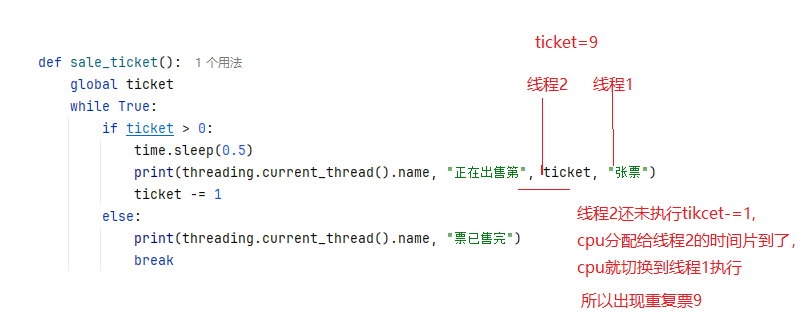
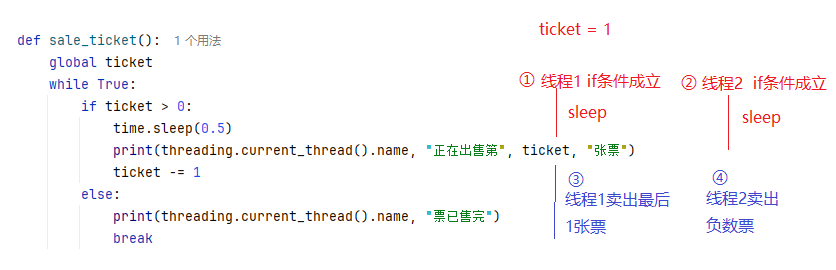
发现上述结果中有重复票,有负数票。
分析原因:因为多个线程之间共享数据会存在线程安全的问题。CPU切换会发生在任意2个指令之间。
3、互斥锁

某个线程要使用共享数据(包含修改操作),先将其锁定,此时其他线程不能使用。直到该线程释放资源,将资源的状态变成“非锁定”,其他的线程才能再次锁定该资源。互斥锁保证了每次只有一个线程进行写入操作,从而保证了多线程情况下数据的正确性。
- 可以通过 threading.Lock() 创建互斥锁。
- 使用 lock.acquire([blocking=True][, timeout=-1]) 来获取锁(blocking 如果为 True,线程会阻塞直到获取到锁。如果为 False,线程立即返回。获取锁成功返回 True,否则返回 False。timeout 为等待的超时时间,单位为秒。如果超时仍未获取到锁,则返回 False。)。
- 使用 lock.release() 释放锁。
"""
    互斥锁保证线程安全
"""
import threading
import time

# 售票函数
def sale_ticket():
    global ticket
    thread_name = threading.current_thread().name
    current_ticket = 0 # 当前线程正在出售的票。保证正确初始化
    while True:
        lock.acquire()
        try:
            if ticket > 0:
                time.sleep(0.5)
                current_ticket = ticket
                ticket -= 1
            else:
                break
        finally:
            lock.release()
        print(f"{thread_name}卖出第{current_ticket}张票")

if __name__ == "__main__":
    ticket = 10
    lock = threading.Lock()
    threads = [threading.Thread(target=sale_ticket, name=f"线程{i}") for i in range(3)]
[t.start() for t in threads]
[t.join() for t in threads]
13.3.4 GIL
Python 全局解释器锁(Global Interpreter Lock, 简称 GIL)是一个锁,同一时间只允许一个线程保持 Python 解释器的控制权,这意味着在任何时间点都只能有一个线程处于执行状态。执行单线程程序时看不到 GIL 的影响,但它可能是 CPU 密集型和多线程代码中的性能瓶颈。GIL并不是Python的特性,它是在实现Python解析器(CPython)时所引入的一个概念。
Python于1991年诞生,从操作系统没有线程概念的时代就已经存在了。由于物理上的限制,各CPU厂商在核心频率上的比赛已经被多核所取代。为了利用多核,Python开始支持多线程。而为了解决多线程之间数据完整性和状态同步,于是有了GIL,GIL 提供了线程安全的内存管理。
GIL 的存在会对多线程的效率有不小影响。甚至就几乎等于Python是个单线程的程序。我们可能会想 GIL只要释放的勤快效率也不会差,至少也不会比单线程的效率差。理论上是这样。
但实际上,Python为了让各个线程能够平均利用CPU时间,会计算当前已执行的微代码数量,达到一定阈值后就强制释放GIL。而这时也会触发一次操作系统的线程调度(当然是否真正进行上下文切换由操作系统自主决定)。从释放 GIL 到获取 GIL 之间几乎是没有间隙的。所以当其他在其他核心上的线程被唤醒时,大部分情况下主线程已经又再一次获取到 GIL 了。这个时候被唤醒执行的线程只能白白的浪费CPU时间,看着另一个线程拿着 GIL 执行。然后达到切换时间后进入待调度状态,再被唤醒,再等待,以此往复恶性循环。
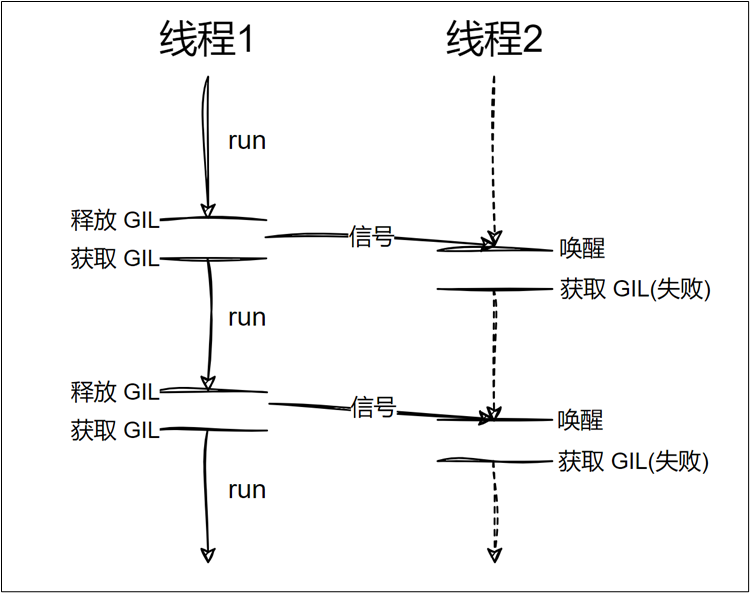
上述实现方式是较为原始的,Python的每个版本中也在逐渐改进GIL和线程调度之间的互动关系。例如先尝试持有GIL在做线程上下文切换,在IO等待时释放GIL等尝试。但是无法改变的是GIL的存在使得操作系统线程调度的这个本来就昂贵的操作变得更奢侈了。
总之,当你的程序需要进行大量的CPU计算时,GIL会成为性能的瓶颈。即使你有多个线程,GIL也会阻止它们在多个CPU核心上并行执行。实际上,多个线程会轮流获取GIL,这样就不能真正并行地使用多个处理器核心。而对于涉及I/O操作(如文件读写、网络请求等)的程序,GIL的影响较小。因为在I/O操作时,线程会释放GIL,其他线程可以在此时执行,这使得多线程在I/O密集型任务中能更有效地并发。
13.4 进程和线程的对比
在Python中,进程、线程和协程是处理并发编程的三种核心方式。(关于协程在FastAPI部分讲解)
为了让你快速理解,可以把它们类比为一家互联网公司:
- 进程:相当于一个独立的公司(拥有独立的办公楼、财务、资源)。
- 线程:相当于公司里的多个部门(共享公司的办公楼和财务,但各自处理不同业务)。
- 协程:相当于部门里的一个超级员工(一个人在同一台电脑上边写代码边回邮件,来回切换,但从来不真正离开工位)。
1. 进程 (Process)
- 本质:操作系统进行资源分配和调度的基本单位。每个进程都有自己独立的内存空间、数据栈等。
- Python中的实现:主要使用
multiprocessing标准库。 - 核心特点:
- 全局解释器锁(GIL)绕过:由于每个进程有独立的GIL,多进程可以真正利用多核CPU并行计算。
- 资源隔离:一个进程崩溃通常不会影响其他进程。
- 开销大:创建和切换进程需要较大的系统开销(内存复制、上下文切换)。
- 通信方式:进程间通信(IPC)较麻烦,常用
Queue、Pipe、Event等。
2. 线程 (Thread)
- 本质:CPU调度的最小单位,是进程内的一个执行流。同一进程内的所有线程共享进程的内存空间。
- Python中的实现:主要使用
threading标准库。 - 核心特点:
- 受GIL限制:由于Python的GIL(全局解释器锁)的存在,同一时刻,一个进程中只有一个线程在执行Python字节码。因此,CPU密集型任务用多线程反而会变慢。
- 轻量级:创建和切换开销比进程小。
- 数据共享方便:共享全局变量,但需要加锁(
Lock)来避免数据竞争。 - 如何判断自己的代码是否有安全问题?(1)有多个线程同时工作(2)多个线程使用了共享数据(3)对共享数据有修改/写操作。
- 适用场景:I/O密集型任务(如网络爬虫、文件读写),因为线程在等待I/O时会释放GIL,让其他线程运行。
3. 协程 (Coroutine)
- 本质:用户态的轻量级线程,由程序员(而非操作系统)控制调度。协程在同一个线程中,通过异步I/O在事件循环(Event Loop)中切换任务。
- Python中的实现:
asyncio库 +async/await语法。 - 核心特点:
- 单线程内并发:只有一个线程,不存在GIL锁竞争问题,也不需要加锁。
- 极其轻量:创建上万个协程毫无压力,切换开销极小(仅仅是函数调用级别的栈切换)。
- 非阻塞:遇到
await(如网络请求、数据库查询)时,立即让出执行权给事件循环,去执行其他协程。
- 适用场景:高并发 I/O密集型任务(如Web服务器、大量API请求)。
4、对比
| 对比维度 | 进程 (Process) | 线程 (Thread) | 协程 (Coroutine) |
|---|---|---|---|
| 调度者 | 操作系统(内核) | 操作系统(内核) | 程序员(用户态) |
| 资源开销 | 最大(独立内存,创建慢) | 中等(共享内存,创建较快) | 最小(几KB栈空间,创建极快) |
| GIL影响 | 不受影响(真正并行) | 受影响(无法利用多核并行) | 不受影响(单线程内跑) |
| 数据共享 | 复杂(需进程通信IPC,如Queue) | 简单(共享变量,但需加锁) | 极简(无需加锁,天然安全) |
| 擅长领域 | CPU密集型(计算、图像处理) | I/O密集型(传统阻塞I/O) | 高并发I/O密集型(异步网络) |
| 崩溃影响 | 互不影响 | 一个线程崩溃可能导致整个进程挂掉 | 互不影响(在进程内) |
5. 如何选择
- CPU密集型任务(如数值计算、机器学习训练):
- 选 进程。使用
multiprocessing或concurrent.futures.ProcessPoolExecutor,绕开GIL,利用多核CPU。
- 选 进程。使用
- 普通I/O密集型(如爬取几百个网页、读写本地文件):
- 选 线程。使用
threading或concurrent.futures.ThreadPoolExecutor。简单易用,且阻塞I/O时能切换。
- 选 线程。使用
- 超高并发I/O密集型(如Web后端同时处理上万连接,或调用大量外部API):
- 选 协程。使用
asyncio+aiohttp。这是目前Python高性能服务的主流方案(如FastAPI、Sanic框架)。
- 选 协程。使用
- 混合型(计算+I/O):
- 选 协程 + 进程池。主逻辑用协程处理网络I/O,计算密集部分用
asyncio的run_in_executor丢给进程池去跑。
- 选 协程 + 进程池。主逻辑用协程处理网络I/O,计算密集部分用
案例1:CPU密集型
多进程
import time
from concurrent.futures import ProcessPoolExecutor

def is_prime(n):
    """判断素数"""
    if n < 2:
        return False
    for i in range(2, int(n ** 0.5) + 1):
        if n % i == 0:
            return False
    return True

def count_primes(start, end):
    """统计区间内的素数个数"""
    count = 0
    for num in range(start, end):
        if is_prime(num):
            count += 1
    return count

def multiprocess_cpu():
    start_time = time.time()

    # 将任务分割成4份,利用多核
    ranges = [(2, 125000), (125000, 250000), (250000, 375000), (375000, 500000)]
    starts,ends = zip(*ranges)

    with ProcessPoolExecutor(4) as pool:
        results = pool.map(count_primes,starts,ends)

    total = sum(results)
    elapsed = time.time() - start_time
    print(f"多进程 - 素数总数: {total}, 耗时: {elapsed:.2f}秒")
    return elapsed

if __name__ == "__main__":
    multiprocess_cpu()
多线程
import time
from concurrent.futures import ThreadPoolExecutor

def is_prime(n):
    """判断素数"""
    if n < 2:
        return False
    for i in range(2, int(n ** 0.5) + 1):
        if n % i == 0:
            return False
    return True

def count_primes(start, end):
    """统计区间内的素数个数"""
    count = 0
    for num in range(start, end):
        if is_prime(num):
            count += 1
    return count

def multiprocess_cpu():
    start_time = time.time()

    # 将任务分割成4份,利用多核
    ranges = [(2, 125000), (125000, 250000), (250000, 375000), (375000, 500000)]
    starts,ends = zip(*ranges)

    with ThreadPoolExecutor(4) as pool:
        results = pool.map(count_primes,starts,ends)

    total = sum(results)
    elapsed = time.time() - start_time
    print(f"多线程 - 素数总数: {total}, 耗时: {elapsed:.2f}秒")
    return elapsed

if __name__ == "__main__":
    multiprocess_cpu()
多协程(仅供参考)
import asyncio
import time

def is_prime(n):
    """判断素数"""
    if n < 2:
        return False
    for i in range(2, int(n ** 0.5) + 1):
        if n % i == 0:
            return False
    return True

def count_primes(start, end):
    """统计区间内的素数个数"""
    count = 0
    for num in range(start, end):
        if is_prime(num):
            count += 1
    return count

# 注意:协程无法真正并行计算,这里只是演示语法
async def async_count_primes(start, end):
    # 使用 run_in_executor 将同步任务丢到线程池
    loop = asyncio.get_event_loop()
    result = await loop.run_in_executor(None, count_primes, start, end)#None=默认线程池
    return result

async def coroutine_cpu_async():
    tasks = [
        async_count_primes(2, 125000),
        async_count_primes(125000, 250000),
        async_count_primes(250000, 375000),
        async_count_primes(375000, 500000)
    ]
    results = await asyncio.gather(*tasks)
    return sum(results)

if __name__ == "__main__":
    start_time = time.time()
    total = asyncio.run(coroutine_cpu_async())
    elapsed = time.time() - start_time
    print(f"协程 - 素数总数: {total}, 耗时: {elapsed:.2f}秒")
注意:当任务很小时,进程启动的”固定成本”远大于实际计算收益,可能线程反而更快。
- 多进程:创建4个进程 → 每个进程启动Python解释器 → 加载库 → 分配内存 → 计算 → 返回结果。这个过程光启动开销就要 0.5秒左右
- 多线程:创建4个线程 → 共享已有进程空间 → 直接计算。启动开销几乎为 0
CPU密集型任务执行流程:

多进程(绕过了GIL):
  进程1 [====计算====]
  进程2 [====计算====]  → 真正同时进行
  进程3 [====计算====]
  进程4 [====计算====]
  总时间 ≈ 单个任务时间

多线程(受GIL限制):
  线程1 [==]
  线程2   [==]        → 交替执行,实际是串行
  线程3     [==]
  线程4       [==]
总时间 ≈ 单个任务时间 × 4 + 切换开销打开任务管理器(Windows)观察(以4核为例):
- 多进程:CPU使用率会飙升到 100%(4核全部满载)
- 多线程:CPU使用率只有 ~25%(只有一个核在工作)
- 协程:CPU使用率只有 ~25%(本质是单线程)
案例2:IO密集型
模拟发送 50 次网络请求,每次请求休眠 0.1 秒(模拟网络延迟),计算总耗时。
多进程
import time
from concurrent.futures import ProcessPoolExecutor

def io_task(task_id):
    """模拟网络请求"""
    # print(f"任务 {task_id} 开始")
    time.sleep(0.1)  # 模拟网络I/O等待
    # print(f"任务 {task_id} 完成")
    return task_id

def multiprocess_io():
    start_time = time.time()

    with ProcessPoolExecutor(50) as pool:#进程数量不能超过61
        results = pool.map(io_task,range(100))

    elapsed = time.time() - start_time
    print(f"多进程 - 完成100个I/O任务, 耗时: {elapsed:.2f}秒")
    return elapsed

if __name__ == "__main__":
    multiprocess_io()
多线程
import time
from concurrent.futures.thread import ThreadPoolExecutor

def io_task(task_id):
    """模拟网络请求"""
    # print(f"任务 {task_id} 开始")
    time.sleep(0.1)  # 模拟网络I/O等待
    # print(f"任务 {task_id} 完成")
    return task_id

def multiprocess_io():
    start_time = time.time()

    with ThreadPoolExecutor(50) as pool:
        results = pool.map(io_task,range(100))

    elapsed = time.time() - start_time
    print(f"多线程 - 完成100个I/O任务, 耗时: {elapsed:.2f}秒")
    return elapsed

if __name__ == "__main__":
    multiprocess_io()
多协程
import asyncio
import time

async def async_io_task(task_id):
    """异步网络请求"""
    # print(f"任务 {task_id} 开始")
    await asyncio.sleep(0.1)  # 异步等待,让出控制权
    # print(f"任务 {task_id} 完成")
    return task_id

async def coroutine_io_async():
    tasks = [async_io_task(i) for i in range(100)]
    results = await asyncio.gather(*tasks)
    return results

if __name__ == "__main__":
    start_time = time.time()
    results = asyncio.run(coroutine_io_async())
    elapsed = time.time() - start_time
    print(f"协程 - 完成100个I/O任务, 耗时: {elapsed:.2f}秒")